




























Core Platform
Infrastructure on Demand
Configure lab environments around your topology. Choose your cloud, set dependencies, and define environment behavior.
Spektra Systems (www.spektrasystems.com) and its affiliates, including cloudlabs.ai, use cookies and similar technologies to recognise you when you visit our websites. This notice explains what these technologies are, why we use them, and your rights to control our use of them. We do not sell your data.
Privacy Policy | Cookie Policy | privacy@SpektraSystems.com
CloudLabs at EDUCAUSE 2026 Meet CloudLabs at EDUCAUSE 2026 · Booth #2015 · Denver, September 29–October 2 Visit our booth
Build, share, and deploy browser-based Windows, Linux, networking, virtualization, and cybersecurity labs for training, certification, testing, enablement, and custom use cases while CloudLabs takes care of provisioning, scaling, and lab operations end-to-end.
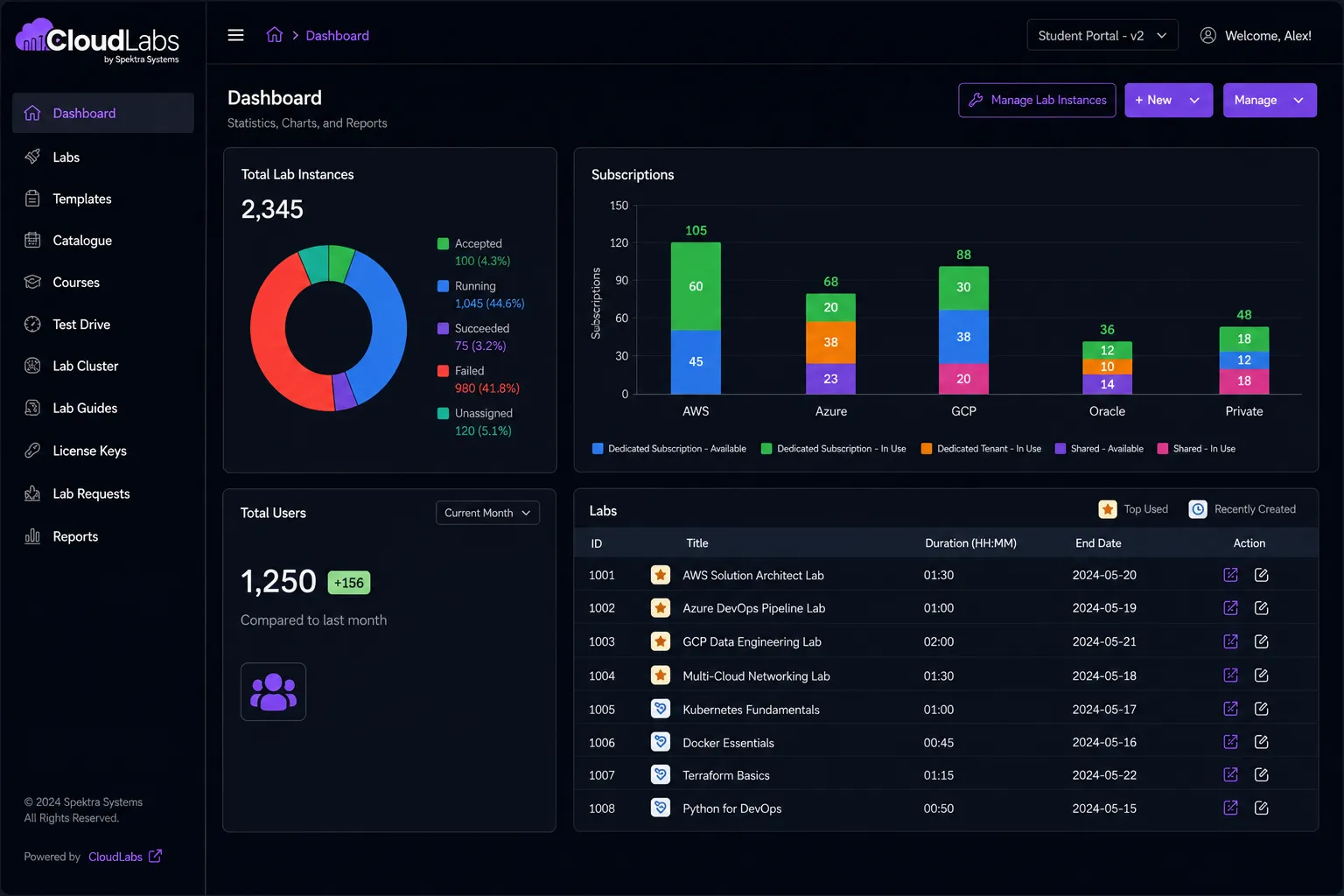
Most trusted lab provider for global ISVs, enterprises, educational institutions, & ed-tech companies of all sizes
CloudLabs redefining success
Years of industry expertise
Labs provisioned worldwide
Participants upskilled
Events supported
Deploy hands-on training, testing, and assessment labs within your own infrastructure. CloudLabs helps organizations create customized lab environments that align with internal systems, security policies, compliance requirements, and technology stacks while maintaining full control over data and resources.
Configure lab environments around your topology. Choose your cloud, set dependencies, and define environment behavior.
Design complete lab flows with guided steps, completion criteria, and challenge-based tasks for real-world scenarios.
Set access levels, permissions, and participant roles to match your enterprise IT, education, and partner programs.
Deliver labs as part of your own platform using your domain, branding, and user journey without extra complexity.
Integrate with Moodle, Canvas, and other LMS platforms through LTI 1.1 and 1.3 for a seamless learner experience.
Create dedicated landing pages for onboarding, POCs, workshops, and certification programs tailored to each audience.
Who It Is For
Wherever hands-on matters, whether for product GTM, classroom learning, partner enablement, or channel distribution, CloudLabs gives every team the same foundation.
Book a demo
Train networking, security, and infrastructure teams with hands-on labs running real enterprise topologies without hardware procurement.

Deliver cybersecurity, networking, and IT curriculum labs in browser with LMS integration and grade pass-back support.

Power Cisco, Juniper, Fortinet, Palo Alto, Check Point, and F5 vendor labs for partner and certification programs.
Core Capabilities
A complete set of capabilities designed to simplify lab deployment, management, and delivery within your own infrastructure.
Users can launch and access lab environments through a web browser without requiring local software installation.
Deploy labs on VMware, Hyper-V, or other supported virtualization platforms within your environment.
Create reusable lab templates, capture snapshots, and quickly restore environments between sessions.
Manage users, permissions, lab assignments, and infrastructure resources from a single administrative interface.
Track infrastructure utilization, lab consumption, system performance, and resource allocation across environments.
Reduce manual setup effort through automated environment deployment, configuration, and lifecycle management.
WORKLOADS AND ENVIRONMENT TYPES
Create the infrastructure environments your teams need for hands-on learning, testing, certification readiness, and technical enablement. From individual virtual machines to complete multi-system environments, CloudLabs helps you build and manage the workloads that matter most to your organization.
Build Windows-based lab environments for training, testing, certification, and workforce enablement.
Create Linux environments that support administration, infrastructure, DevOps, and technical learning scenarios.
Deploy multi-machine environments with the virtualization, networking, and storage components required for real-world infrastructure scenarios.
Run applications that require dedicated servers, services, databases, or supporting infrastructure to operate.
Deploy software appliances and pre-configured systems used for product training, demonstrations, and hands-on learning.
Create realistic environments that replicate operational scenarios, troubleshooting exercises, and hands-on practice activities.
CloudLabs vs DIY
Many teams try to build and manage their own lab environments. Here is how that approach compares with a fully managed CloudLabs deployment.
Discover how CloudLabs helps organizations streamline lab operations, reduce manual effort, and deliver impactful hands-on experiences at scale.
WeareincrediblypleasedwithourexperienceusingCloudLabsbySpektraSystems.Theirresponsivenessandsupporthavebeennothingshortofoutstanding.Theydemonstratedremarkableflexibilityinaccommodatingouruniqueprocesses,resultinginaseamlessandhighlyproductivecollaboration.ThankstoCloudLabs,wehavesuccessfullydeliveredAzure-relatedcoursestoasubstantialnumberofstudents.








FAQ's
Proof of Concept
Evaluate your infrastructure, configure lab environments, and ensure deployment readiness before rolling out on-prem IT labs across teams and programs.
Share Your Request
Share your request to replicate the intended network, virtualization, storage, and security architecture.
Configure the Right Environment
Work with CloudLabs experts to design lab environments that align with your infrastructure standards, operational workflows, and technical requirements.
Assess Performance and Scalability
Measure infrastructure utilization, provisioning workflows, user concurrency, and system performance before expanding to larger audiences.
Reduce Deployment Risks
Identify configuration gaps, integration challenges, and operational bottlenecks early while changes remain easy to implement.
Get Expert Deployment Support
Receive hands-on guidance for environment setup, automation, troubleshooting, and infrastructure best practices from CloudLabs specialists.
Built around your topology, controls, and outcomes.